Does GTA 6 auto save? How to save your game manually (15 slots)
Yes, GTA 6 auto saves after missions into one Autosave slot. To save manually: Pause > Game > Save Game, pick one of 15 slots. Why Save is greyed out.
Quick answer
Yes, GTA 6 auto saves. It keeps one Autosave entry that is rewritten as you play (mainly after missions). For a save you control, open the pause menu, go to Game > Save Game and pick one of 15 manual slots. You can't save by hand during the prologue or in the middle of a mission.
How to save in GTA 6
- Press Options (PS5) or Menu (Xbox Series X|S) to pause.
- Go down to the Game tab.
- Select Save Game.
- Choose any of the 15 slots. Saving over a used slot asks "Overwrite saved game?".
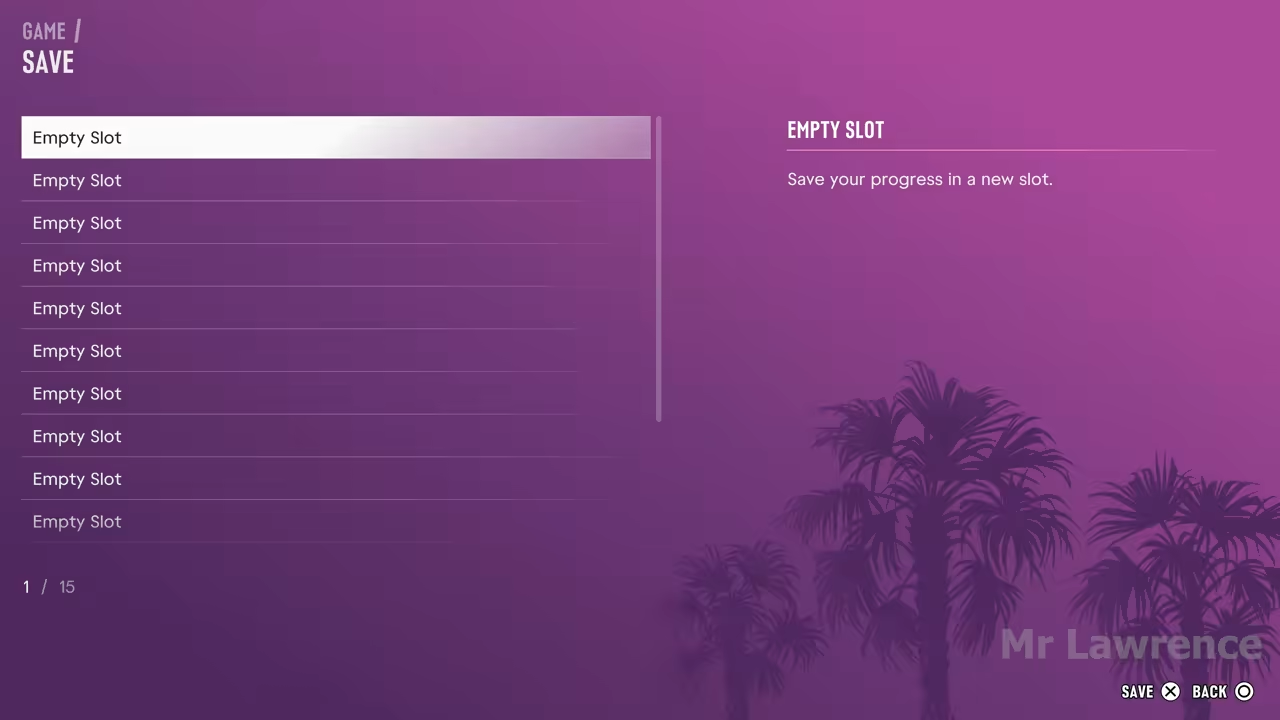
Each save shows the last mission you finished, a picture, the date and time, and your completion percentage. You can save almost anywhere in free roam, even on a boat. You don't need a safehouse or a bed.
How autosave works
| Autosave | Manual save | |
|---|---|---|
| Slots | 1, rewritten every time | 15 |
| When | After missions and key story moments | Whenever you choose in free roam |
| Can you overwrite it yourself? | No | Yes |
| Where to load | Game > Load Game, listed as "(Autosave) Chapter (x%)" | Game > Load Game |
The autosave name shows where the last autosave happened, not where you are now. Mid-mission progress isn't written to the list straight away. When you boot the game again it loads the save you were on.
Why "Save Game" is greyed out
- Prologue: manual saving stays locked until the prologue is over. Until then you rely on the autosave.
- During a mission: Save Game is dimmed. The pause menu offers Retry Checkpoint and Restart Mission instead. Finish or quit the mission first.
- Cheats: guides report cheats disable saving for that session (GTA 6 cheat codes).
Save tips that prevent lost progress
- Save to a new slot before big missions. There is no mission replay menu so far, so an old manual save is the only way to replay one.
- Before loading an old save, save your current run to a spare slot. The single autosave only tracks your latest run.
- Rotate 2-3 slots instead of always overwriting one. A launch bug in a Chapter 2 objective has only been fixed by loading an older manual save.
- Bank your cash before risky jobs (money guide, BuckMe savings).
Cloud saves: PS5 backs up saves to PlayStation Plus cloud storage, and Xbox syncs saves automatically.
How to use checkpoints and restart missions
- Pause screen options: Look on the right side of the pause screen during missions to find quick recovery options.
- Retry checkpoint: Select this option to jump right back to your last checkpoint if a fight goes wrong instead of loading an old save.
- Restart mission: Select this option to start the entire current mission over from the beginning.
How to load a saved game in GTA 6
- Opening the menu: Open up the pause menu and navigate to the game tab.
- Loading a save: Select the load game option from the menu.
- Selecting a file: Choose your latest autosave or pick one of your manual save files to load.
- Autosave details: The load screen shows the mission you are currently on or just finished, alongside the exact timestamp of when the autosave occurred.
FAQ
Does GTA 6 have autosave?
Yes. One Autosave entry, updated after missions and at important moments. You can load it but not overwrite it by hand.
How many save slots does GTA 6 have?
15 manual slots plus the separate autosave.
Can I save during a mission in GTA 6?
No. Save Game is greyed out until the mission ends. Use Retry Checkpoint or Restart Mission instead.
Is there a mission replay in GTA 6?
No replay menu has been found. Keep manual saves before missions you want to play again.
More for new players: beginner guide, mission fail states and inventory.